Connect
How to connect to your brand new Kiwi? There are a couple of ways to do this and we do recommend:
- Via serial: minicom for Linux and OSX, putty for Windows.
- Ethernet: ssh for Linux and OSX, putty for Windows.
Serial connectivity is available via USB-C UART connection using a simple USB-C cable.
Putty (Windows)
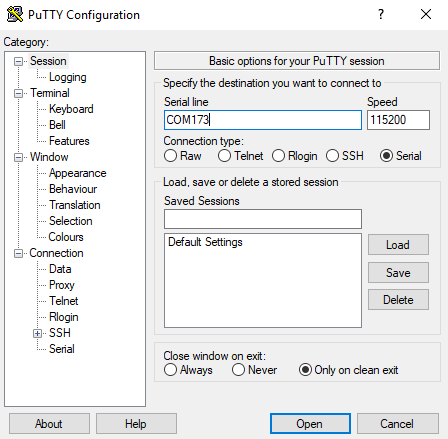
Simply run the program, select serial option, enter a COM port number, select the baudrate 115200 and click "connect".
Minicom (Linux, OSX)
Firstly install minicom to your host machine and proceed to the setup - minicom -s and choose Serial port setup, here you can change the default serial device that will be connected to, if it is not declared by a flag `-D` but the main thing you need to change is to turn off Hardware flow control and set Baud rate to 115200
If everything is setup correctly, run:
$ minicom -D /dev/ttyUSB0
You can check your available serial devices with this command:
$ ls /dev/ttyUSB*
To exit from minicom press ctrl+a x.
Ethernet
putty (Windows)
Putty can be used for SSH, Telnet and Serial connectivity as well. It's a Swiss knife tool for Windows. Usage is as simple as in serial mode, just instead of serial select ssh, enter IP address and connect.
ssh (Linux, OSX)
SSH is enabled by default without password. Kiwi can be connected:
ssh root@192.168.1.1
Where root is your default root user and 192.168.1.1 IP address.