This is an old revision of the document!
Connect
How to connect to your brand new Kiwi? There are a couple of ways to do this and we do recommend:
- Via serial: minicom for Linux and OSX, putty for Windows.
- Ethernet: ssh for Linux and OSX, putty for Windows.
Serial connectivity is available via USB-C UART connection using a simple USB-C cable.
Putty (Windows)
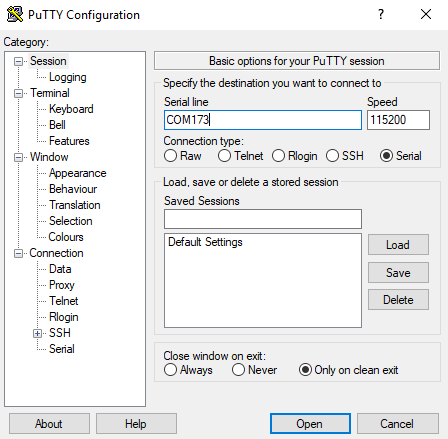
Simply run the program, enter a COM port number, select the baudrate 115200 and click "connect".
Minicom (Linux, OSX)
Firstly install minicom to your host machine and proceed to the setup - minicom -s and choose Serial port setup, here you can change the default serial device that will be connected to, if it is not declared by a flag `-D` but the main thing you need to change is to turn off Hardware flow control and set Baud rate to 115200
If everything is setup correctly, run:
$ minicom -D /dev/ttyUSB0
You can check your available serial devices with this command:
$ ls /dev/ttyUSB*
To exit from minicom press ctrl+a x.